|
21st Century Forensic Animations
(October 2006)
Just as DNA samples are being used as a key tool in courtrooms as evidence to
verify the innocence or guilt of a suspect on trial, forensic animation -
which utilizes particle effects - is gaining popularity as a method that
makes use of CG tools to help expert witnesses and lawyers reconstruct a
crime scene in a courtroom.
Established in 1989,
21st Century Forensic Animations provides forensic
animations for courtroom use. These animations bring realistic, insightful
animation to cases including motor vehicle accidents, murder, aviation,
product liability, grade crossing, FELA and OSHA, to patent infringement,
fire and explosions. They are intended to illustrate through computer
graphics the technical opinions offered by expert witnesses. wondertouch
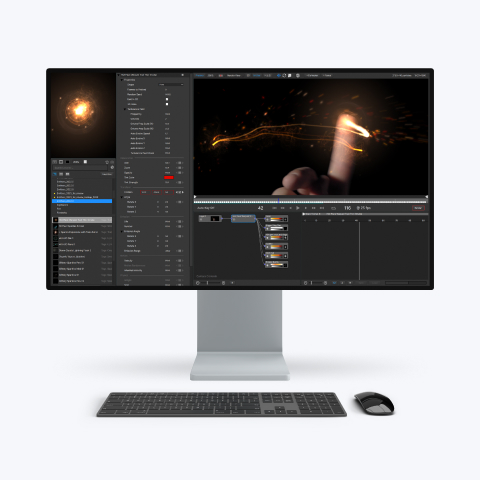
particleIllusion 3.0 on Windows XP has been in use in the company's
operations department for a little more than two years.
Randy Matzkanin, a professional engineer, and director of operations at 21st
Century has produced forensic animations since 1987, as well as oversees the
company's animation team. "I first saw particleIllusion at Siggraph in 2004.
We had just finished a case involving a factory fire and the particle systems
we had been using had slowed feedback and rendering to painful levels.
Watching the speed of particleIllusion during the demonstrations - as we were
still licking our wounds -- sold us immediately!"
Matzkanin explains that because of the prohibitive cost of producing short
animations, only the more serious cases warrant them. The timeframe for the
majority of these cases can take from two to five years from the date of
incident to the trial during which time lawyers are gathering testimony and
the experts are studying evidence. "Forensic animation doesn't use effects
just because they look cool but are used to illustrate major details of a
case. It is one of the final steps in the process when we are typically
working under tremendous deadline pressure. Ideally, we hope to have at least
6 weeks for the creation process to allow for multiple revisions and
questions that might come up during production but have had to complete many
in a fraction of that time.
"Any tool, like particleIllusion, that helps to speed up our work flow is
critical. One of the great features of the software is how easy it is to add
particleIllusion effects to a background scene and get an instant preview of
a particle system by selecting from one of the pre-set emitters in the
extensive particleIllusion library. Additionally, all of the tools for
editing and animating the particles, masks, and forces are obvious and very
easy to use.
"Our directors are the experts and/or attorneys that hire us, not your
typical effects directors. They often are unable to describe exactly what
they want in advance so we customarily must work through multiple iterations
until we get the desired effect. Using particleIllusion, we can set up the
effects in a fraction of the time and get revisions out daily without major
rendering time."
In addition to particleIllusion 3.0, the production pipeline at 21st Century
is comprised of Autodesk AutoCAD to handle survey data and preliminary scene
layout, Autodesk 3dsMax for modeling, animation and rendering and Autodesk
Combustion for compositing. "Although a subset of particleIllusion is built
into Combustion, we prefer to use wondertouch's more extensive, stand-alone
version. Our typical workflow is to render scenes in 3ds Max, composite
effects inside of particleIllusion and add titles, counters or other graphics
in Combustion."
Matzkanin explains that the process of crafting digital representations
requires 21st Century modelers and animators to gather background features
that are necessary for the viewers to orient themselves. "The visual
reenactments must accurately convey the points being made by the expert
without adding unnecessary or unsubstantiated detail and yet be sufficiently
real so they won't distract the jury from the point being made. A rather
common misconception is that we just scan photos and videos and the computer
produces the scene," says Matzkanin. "The reality is that scene items are
generated from multiple sources, which often include surveying the site with
total station equipment, taking photos and making measurements, as well as
using existing blueprints or surveys. We also gather police reports and
police crime scene photos, and a coroner's report may provide information
that will help to position the "actors" in the animation as well as provide
details such as height and weight.
"The same attention to real-world measurements is used when modeling the
vehicles, people and other "actors" for the scene. Motion of the various
"actors" is usually specified by the expert, lighting is defined for the
scene and virtual cameras are created."
"With respect to creating effects such as dust, smoke, fire, rain or snow,
particleIllusion's real-time feedback and Open GL rendering makes it easy to
adjust and tweak and get immediate feedback without the need to re-render.
Anyone familiar with using layers in Photoshop or video editors will
appreciate the layer capabilities in particleIllusion. Some of our more
complex scenes can have many layers that each can contain any number of
particles, blockers (masks) and forces. By turning off all of the layers
except the one being adjusted, the speed of our workflow is enhanced."
Reconstructing fire incidents is an area where particleIllusion is especially
useful. Matzkanin's first project using particleIllusion used particle
effects to demonstrate how an electrical fire spread throughout a 43,000+ sq.
ft. house in Dallas.
"Based on the guidance of the experts who studied the aftermath of the fire
to gather clues of how it progressed, we built the fire up layer after layer
to illustrate the spread of the fire and what the smoke looked like. First,
we selected a few of the many pre-set emitters. One particle system may have
four or more emitters to account for flames, smoke and sparks, and we had
plenty of pre-sets to choose from. Next we adjusted and animated the overall
properties of each particle system to make them fit better into our specific
shots. For this animation, we needed to change the order of some of the
emitters so the smoke would appear more in front of and behind the flames,
and relied mostly on line type emitters to portray fire creeping along the
rafters.
"For me, one of the biggest challenges was using a 2D system to get the
effect of fire coming toward the camera. The key was using the layers so that
a rafter in front of the flames could be masked from flames behind it and
then have flames grow on the rafter and in front of it on subsequent layers.
After we achieved a correct look for the fire and smoke, we adjusted the
lighting in the scene to account for the light produced by the fire,
re-rendered that and then composited the fire and smoke in particleIllusion.
"Without the use of particleIllusion, we would have needed at least an
additional 3 weeks - time we didn't have -- and even at that we probably
would have had to cut back the scenes considerably. Instead, the software's
speed and efficiency allowed us to a create quality and realistic animation
under severe time constraints."
|